How to plan a motorcycle ride, step by step
A good ride starts with three questions before any line is drawn on the map: how far, what kind of road, where to stop. This guide takes them in order and shows where each step lives in the Motoseyir app.
Write down what the ride is for
A single afternoon of twisty road and a three-day pass tour are not planned the same way. Before you open a map, note three things: how many days you have, how many of you are riding, and what you want from the road. Curves, coastline and mountain passes are three different goals, and trying to fit all of them into one day usually makes the ride tiring rather than good.
Decide early whether you ride alone or in a group. In a group the slowest rider sets the pace and the stops get longer, so the plan needs slack.
Work out daily distance from riding hours
Starting from kilometres can mislead you: the same hundred kilometres takes an hour on a motorway and three on a mountain road. A sturdier method is to decide how many hours you want to ride that day and derive the distance from that.
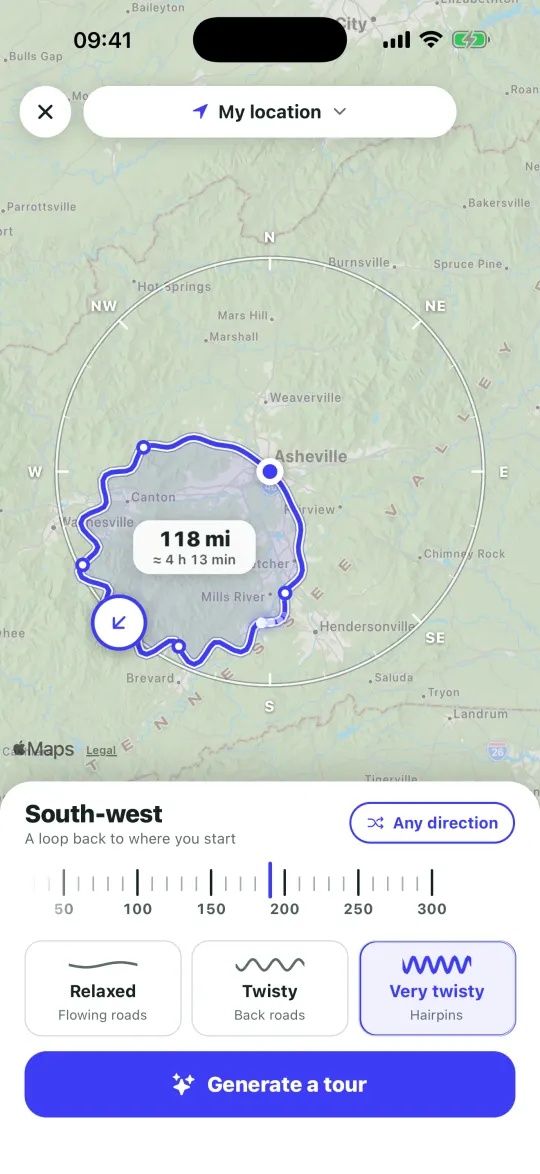
Motoseyir’s Generate a tour screen works this way. You choose a tour length between 30 and 300 km, or choose hours instead, and it converts hours to distance in half-hour steps. Treat riding time and breaks as separate items. The ride log keeps moving time and real breaks apart too, so the next plan can be more realistic.
Choose the kind of road
A route in Motoseyir can be built in three ways:
- Shortest: the default. It compares several alternatives for the same two points and recommends the one with the fewest kilometres, even if it takes slightly longer.
- Back roads: avoids motorways and toll roads and uses side roads. In Turkey and Greece the route is calculated on Motoseyir’s own server (Pro).
- Coast: looks for roads that follow the shoreline on tours (Pro).
On big pass roads such as the Alps the main route is already the road you want, so searching for small roads rarely helps there. Back roads pay off where main roads are busy and dull.
Place the stops and check the order
Open the tour with a start and an end, then add the stops in between. In Motoseyir you add a stop in two ways: type into the search field at the top, or long-press an empty point on the map. A bend, a viewpoint or a village junction without a name can be a stop as well.
On a multi-stop route the Best order button (Pro) rearranges the stops for the shortest total riding distance. In the app’s own example the same four stops come to 57.1 km in your order and 46.9 km in the order the app found, and a single tour takes up to 26 stops. If the order matters to you, for lunch or a sunset point, compare it with your own before accepting.
The Discover tab lists coves, campsites, places to eat, fuel stations and passes around the tour, with a rating and the stop each is closest to. Tap one to add it as a stop (Pro).
Fuel and weather
The route card shows the estimated fuel use before you leave: litres in Turkey, gallons in the US. Tap the consumption figure and enter your bike’s real value to update the estimate. Filling up before you enter mountain or remote roads is a good habit.
For weather the app looks at four points along the route. If rain is expected at the time you will arrive, Motoseyir warns you in advance; when it is dry, nothing appears on screen. If a warning shows up, consider shifting your departure time.
Riding with a group
When one person creates a group, a single code is generated; everyone joins with it and can see each other on the route. Location is shared only while a ride recording or navigation is running and is deleted from the server afterwards. Joining a group by invite or code is free, creating one is Pro.
While a group route is being ridden, the intercom asks once; if you accept, your voice goes only to your group and is not recorded. A Bluetooth helmet can connect directly.
If you would rather let a tool draw the loop first, the route generator builds up to three round trips from your start point, and routes near you shows legendary rides and passes on the map.
Five checks before you leave
- Save the tour on your phone. You need no online account; tours stay on the device.
- Check the fuel estimate for the longest leg on the route card.
- If a high pass is on the route, find out which months it is closed. The app’s pass list shows closing months where they are known.
- Read the weather warning and move your departure if needed.
- If you ride with friends, share the tour with a code; the receiver opens it under With a code and gets the tour on their own phone.
Draw the ride yourself in Motoseyir
In Motoseyir the plan is yours: you pick the start and end, place the stops yourself and reorder them as you wish. You can also give the app a direction and a time and let it draw a tour; three options come back, and if you do not like them you can ask for another.
- On My Tours, type a name and tap Create.
- Add your start, your end and the stops in between, using search or a long press on the map.
- On a multi-stop tour try Best order (Pro); if it does not suit you, fix the order by hand.
- Tap Start; the stops are handed to navigation one after another.
If you need an idea, ready-made routes sit in the Legendary tab; tap one and its stops are copied into your tours, where you can change them.
Frequently asked questions
How many kilometres a day should I plan for a motorcycle trip?
There is no single number, because the same distance takes very different times depending on the road. Decide first how many hours you want to ride. In Motoseyir you can pick tour length in kilometres or in hours; if you pick hours, it converts to distance in half-hour steps.
Do I need an account to plan a ride?
No. Motoseyir does not ask for a name, email or phone number. Route calculation and navigation are free and unlimited in Turkey, Europe and the US; the free tier keeps 1 saved tour, and unlimited tours need Pro.
How many stops can one tour have?
Up to 26 stops in a single tour. On a multi-stop route, Best order (Pro) rearranges the stops for the shortest total distance.
More guides
Sources
Figures were taken from the pages below and from Motoseyir’s own data. Opening and closing dates change every year with the snow, so check the operator’s or road authority’s current notice before you go.